Reframe a shot
Turn a portrait video into a landscape shot with Luma Reframe
To reframe a video in Breme, select a completed clip on your project canvas and choose Edit in its item toolbar. Choose Reframe video in the panel on the left, check the source thumbnail, and set the target aspect ratio. Describe the framing, review the credit cost, and press Reframe. Preview the separate result, compare it with the original, then use Edit → Export to review dimensions and formats.
Before you start
- A completed video in a Breme project
- Sufficient credits and access to Luma Reframe
Open the source clip’s editing actions
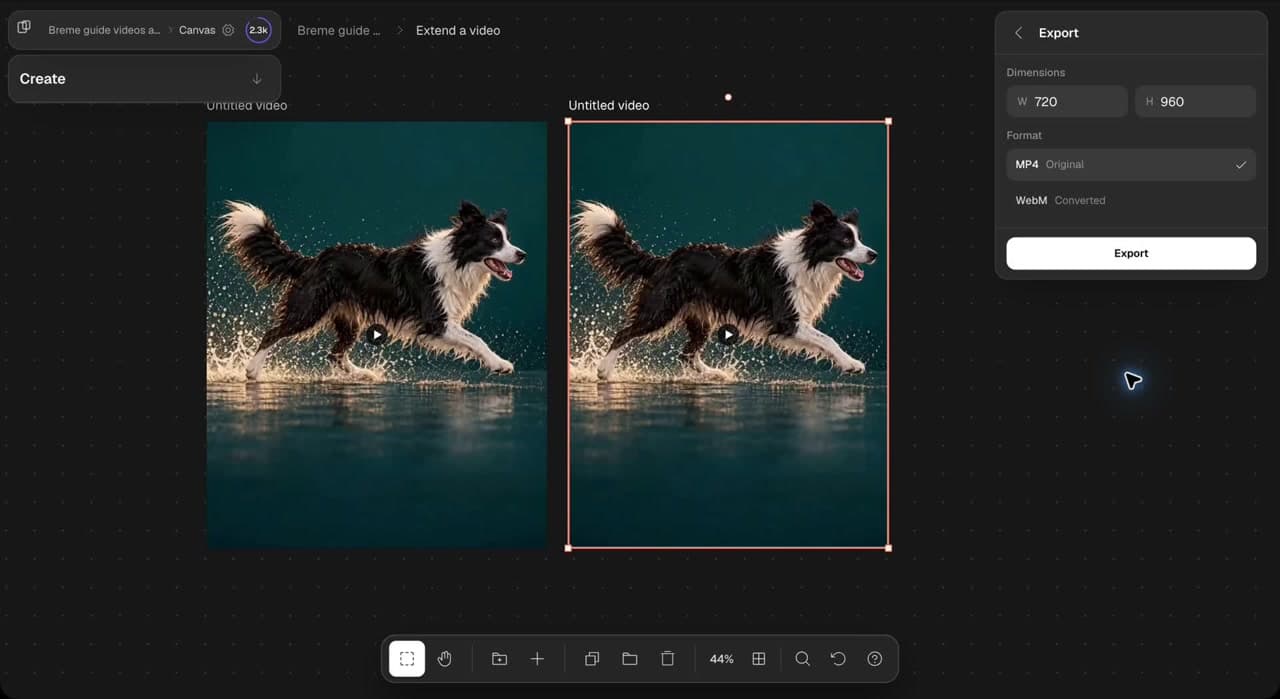
Open your project and choose Project canvas, then enter the folder containing your clip. Select the completed video and choose Edit in its item toolbar. Selection alone does not open the editing panel. Choose Reframe video in the panel on the left and check the source thumbnail. The walkthrough uses a five-second clip of a dog running through shallow water.
Choose the landscape ratio and describe the framing
Check that the panel uses Luma Reframe. Open Aspect ratio and choose 16:9 for the landscape result shown here. Describe the framing you want, including the subject, motion, and scene details to preserve.
Reframe this shot to 16:9 landscape. Keep the same dog fully visible as it runs through shallow water. Preserve its appearance, running motion, splashes, lighting, and steady camera. Extend the surrounding water and background naturally. One continuous shot, no cuts, text, or logos.
Reframe and compare the result
Review the source, target ratio, and displayed credit cost, then press Reframe. Wait for the separate result. Play it in the app and check that the dog stays in view throughout the shot. Inspect the added background, movement, and edges, then compare it with the original. The walkthrough skips the generation wait.
Review export options
Select the new result and choose Edit in its item toolbar, then choose Export in the panel on the left. Review the dimensions and available formats. The recorded result is 1280 × 720, with MP4 Original and WebM Converted options. Choose the format you need and press Export when ready to save. The original clip remains available for another framing.
Common questions
Features in this guide: Reframe Video